
How to Stop Back Pain While Gaming
Table of Contents
- Why Back Pain Happens During Long Gaming Sessions
- Set Up Your Gaming Station to Prevent Back Pain
- How to Improve Gaming Posture During Play
- Stretches for Gamers Lower Back Pain
- How Long to Play Games Before Taking a Break
- Ergonomic Gaming Chair Benefits and Lumbar Support
- Post-Gaming Recovery: Active Recovery and Movement
- Frequently Asked Questions
Last Updated: September 25, 2026
Why Back Pain Happens During Long Gaming Sessions
Back pain while gaming stems from poor posture, prolonged sitting, and weak core stability. Hunching over a controller for hours curves your spine unnaturally, tightens hip flexors, and places unsustainable pressure on your lower back.
Gaming's mental demands intensify the problem: you lean forward, round your shoulders, and strain toward the screen. Repetitive strain gradually builds tension in your lumbar, thoracic, and surrounding muscles.
Back pain while gaming isn't inevitable, it signals that your setup or habits need adjustment. You can prevent it with proper ergonomics and recovery practices.
Set Up Your Gaming Station to Prevent Back Pain
Your gaming station is the foundation for preventing back pain. Three critical components, monitor height, chair positioning, and lumbar support, solve half the problem.
Monitor and desk height calculations
Your monitor should sit at eye level when you sit upright with arms at 90 degrees. Position it 50-70 centimetres away (about an arm's length), with the top aligned to your eye line when looking straight ahead.
Your desk height matters equally: elbows should rest at 90 degrees when arms are on the desk.
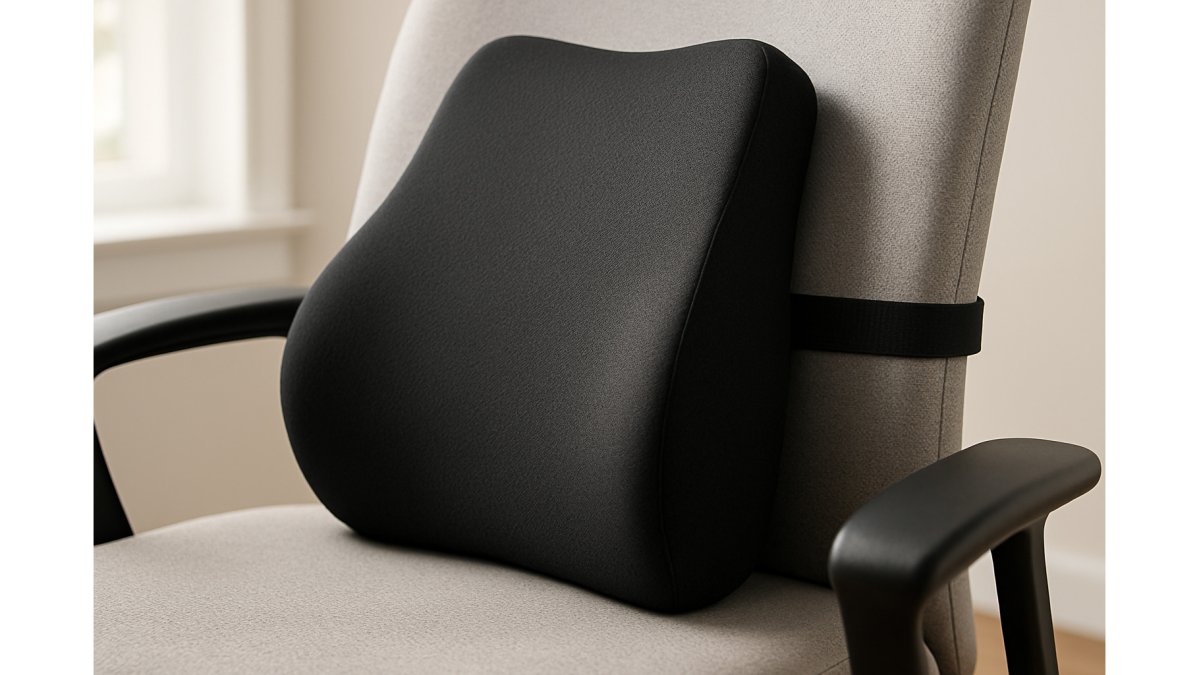
Chair positioning and lumbar support
How to Improve Gaming Posture During Play
Good posture requires conscious effort initially. Start with scapular retraction: pull shoulder blades back and down before each session with 10 backward shoulder rolls to engage upper back muscles and prevent forward slouch.

Stretches for Gamers Lower Back Pain
Stretching targets the muscle groups that gaming tightens. Hip flexors, hamstrings, and lumbar muscles all need regular attention.
Spinal alignment stretches
Cat-cow: on hands and knees, arch your back (cow, 3 seconds), then round your spine (cat, 3 seconds), repeat 8 times. Child's pose: kneel, sit hips back, extend arms forward, hold 30 seconds. Spinal twist: lie on back, pull one knee across your body, hold 30 seconds per side.
Hip flexor and core mobility
Lunge stretch: step forward, keep back knee on floor, push hips forward gently, hold 30 seconds per side. Planks: hold 20-30 seconds in a straight line, core engaged (not lower back), repeat 3 times.
| Stretch | Duration | Frequency | Target Area |
|---|---|---|---|
| Cat-cow | 3 seconds each | 8 reps before gaming | Entire spine |
| Child's pose | 30 seconds | 1-2 times daily | Lower back |
| Spinal twist | 30 seconds per side | 1-2 times daily | Thoracic and lumbar spine |
| Lunge stretch | 30 seconds per side | 1-2 times daily | Hip flexors |
| Plank | 20-30 seconds | 3 reps daily | Core muscles |
How Long to Play Games Before Taking a Break
The optimal break interval depends on three factors: your current fitness level, gaming intensity, and pain sensitivity. A one-size-fits-all 60-90 minute rule misses the nuance of how fatigue actually accumulates.
Understanding the fatigue curve
Postural stability declines predictably: 45-60 minutes maintains alignment well; 60-90 minutes brings micro-fatigue and unconscious slouching; beyond 90 minutes, pain risk accelerates sharply. Professional esports organisations mandate 5-10 minute breaks every 60 minutes during competitive play because performance drops measurably due to postural collapse.
Break timing by gaming type
Casual gaming: 90-120 minutes before a break. Competitive gaming: 45-60 minutes maximum; mental intensity masks fatigue. Streaming: 30-45 minutes; managing camera, chat, and gameplay compounds strain.
Elevate Supports Ultimate Comfort →
The break protocol that works
Execute a structured 5-10 minute reset: (1) Stand and move 2 minutes, walk or climb stairs. (2) Spinal mobility 2 minutes, 8 cat-cow stretches, 5 arm circles, 20 seconds child's pose. (3) Hip activation 1 minute, 10 squats or 20 seconds marching. (4) Hydration and visual reset, drink water and look at a distant object 20+ seconds.
Ergonomic Gaming Chair Benefits and Lumbar Support
A proper ergonomic gaming chair supports spinal alignment and reduces the load on your lower back. Not all gaming chairs are ergonomic, many prioritise aesthetics over function.
Look for chairs with:
- Adjustable lumbar support that you can move up or down
- Adjustable armrests that support your forearms at desk height
- A seat depth that supports your thighs without cutting off circulation
- Recline function that allows you to shift positions throughout the day
- Breathable materials that prevent heat buildup during long sessions
Post-Gaming Recovery: Active Recovery and Movement
What happens after you stop gaming is as important as your posture during play. Your muscles remain in a fatigued, shortened state for 30-60 minutes after a session ends. Without active recovery, this shortened state becomes your new baseline, gradually reducing your range of motion and increasing injury risk.
The immediate post-gaming window (0-15 minutes)
Do not sit down immediately after gaming.
Spend the first 5 minutes walking. This doesn't need to be intense, a casual walk around your home or office is sufficient. The goal is to keep your heart rate elevated slightly and maintain muscle activation at a low level.
- Hip flexors (lunge stretch): 60 seconds per side. Your hip flexors shorten during sitting; stretching them immediately after gaming helps prevent the pelvic tilt that can increase lumbar strain.
- Hamstrings (forward fold): 60 seconds. Tight hamstrings can pull your pelvis backward, potentially creating compensatory lumbar strain.
- Chest and shoulders (doorway stretch): 60 seconds. Gaming can round your shoulders forward; this stretch helps reverse that position.
- Lower back (child's pose): 60 seconds. This helps decompress your lumbar spine after sustained sitting.
The extended recovery phase (2-6 hours post-gaming)
Later in the day or evening, perform a more thorough mobility and strength session. This is where adaptation happens, where your body rebuilds stronger and more resilient.
Mobility work (10-15 minutes): Repeat the stretches above, but add deeper work:
- 90/90 hip stretch: Sit with one leg bent in front of you at 90 degrees, the other bent behind you at 90 degrees. Fold forward over the front leg. Hold 90 seconds per side. This targets deep hip external rotators that can tighten during gaming.
- Thoracic rotation: In a quadruped position, place one hand behind your head and rotate your torso, opening your chest toward the ceiling. Hold 3 seconds, repeat 10 times per side. This helps reverse the thoracic flexion that can occur with gaming posture.
- Spinal decompression: Hang from a pull-up bar for 20-30 seconds if available, or perform an inverted hang using an inversion table. This helps decompress your intervertebral discs after sustained compression from sitting.
Focus on posterior chain exercises:
- Barbell rows or dumbbell rows: 3 sets of 8-10 reps. This strengthens your back muscles, which can help counteract the forward slouch that may occur during gaming.
- Face pulls: 3 sets of 12-15 reps. This targets your rear deltoids and upper back, which can help with rounded shoulders.
- Planks: 3 sets of 30-60 seconds. This builds core endurance, which is important for maintaining neutral spine during long gaming sessions.
- Deadlifts or hip thrusts: 3 sets of 8-10 reps. This strengthens your posterior chain and glutes, which can help stabilise your pelvis and reduce lumbar strain.
Hydration and sleep
Drink water throughout your gaming session and for 1-2 hours afterward. Dehydration can reduce muscle elasticity and increase cramping. Aim for 500 ml of water for every hour of gaming.
Frequently Asked Questions
How long can I game safely before back pain starts?
Most people experience discomfort after 1-2 hours of continuous gaming without proper ergonomic setup or breaks. However, with correct posture, lumbar support, and a well-configured chair, many gamers extend this to 4-6 hours comfortably. The key is taking micro-breaks every 30-45 minutes to stretch and reset your spine alignment. Your individual tolerance depends on core stability, existing posture habits, and whether you have pre-existing back issues.
Can gaming cause permanent back damage?
Repeated poor posture during gaming can contribute to chronic musculoskeletal problems over time, including disc strain and spinal misalignment. However, these issues are not inevitable. Preventative measures, ergonomic seating, proper monitor height, regular stretching, and active recovery, can significantly reduce long-term risk. If you already experience chronic pain, consulting a physiotherapist is advisable to address underlying conditions before they worsen.
What's the difference between a gaming chair and a regular office chair for back support?
Ergonomic gaming chairs are specifically designed with higher backrests, integrated lumbar support, and neck pillows to accommodate the reclined posture gamers often adopt. Standard office chairs prioritise upright sitting. For gaming, a chair with adjustable lumbar support, armrests at elbow height, and a seat that promotes neutral spine alignment works best. Adding a dedicated memory foam lumbar cushion to any chair can also deliver significant relief if a full gaming chair isn't affordable.
Will a memory foam lumbar cushion actually help, or will it flatten out quickly?
High-density memory foam cushions maintain their shape and support well. Premium options like the Elevate Support Memory Foam Lumbar Support Cushion (£17.99) use durable foam engineered to resist compression. Look for products with a comfort guarantee, our 30-day guarantee lets you test whether a cushion genuinely relieves your pain before committing long-term.