
How to Stop Back Pain at Desk: 7 Practical Fixes
Table of Contents
- Why Sitting All Day Causes Back Pain at Your Desk
- How to Sit Properly at a Desk to Reduce Strain
- Ergonomic Desk Setup for Back Pain: Chair, Monitor and Footrest
- Desk Stretches for Lower Back Pain You Can Do in Two Minutes
- Heat, Breathing and Pain Management at Your Desk
- When to See a Doctor: Red Flags for Desk-Related Back Pain
- Conclusion
- Frequently Asked Questions
Last Updated: September 23, 2026
Why Sitting All Day Causes Back Pain at Your Desk
Learning how to stop back pain at desk work starts with understanding what prolonged sitting does to your spine, and the first step is recognising why back pain at desk jobs builds up over time. Sit for hours and the discs between your vertebrae lose fluid while supporting muscles weaken from disuse, creating the stiffness many desk workers feel by mid-afternoon.
Office workers, remote employees, and gamers often describe a pattern of discomfort that builds gradually and becomes hard to ignore.
The problem isn't sitting itself. It's sitting still.
Your spine's natural curves act like shock absorbers. A neutral spine keeps them intact; slouching reverses them, loading pressure onto discs and stretching supporting muscles.
A common mistake is assuming you need an expensive chair. You don't. Small changes to how you sit and how often you move matter more than any single purchase.
Below, we'll show you how to reduce strain, set up your workspace, and build habits that protect your back.
How to Sit Properly at a Desk to Reduce Strain
Good posture means keeping your spine naturally aligned while your muscles stay relaxed. The goal is a neutral spine, not a rigid, military-straight back, tension creates its own problems.
Here's the setup that works for most people:
- Feet flat on the floor or on a footrest
- Knees at roughly 90 degrees, level with or slightly below hips
- Hips pushed back into the chair
- Shoulders relaxed, not hunched forward
- Screen at eye level so your neck stays neutral
- Elbows close to your body, bent at about 90 degrees
Trying to hold perfect posture through willpower fails within 20 minutes. Instead, set up your chair so good posture is the default.
Neutral Spine and Pelvic Tilt
Your pelvis is the foundation. Tilt it slightly forward and your lower back curves naturally. Tilt it back and you slouch.
Sit tall, then rock your pelvis forward and back until your weight rests evenly on your sit bones. That's your neutral position.
Many people find a small cushion helps hold this position without conscious effort.
Lumbar Support That Actually Stays in Place
Lumbar support only works if it stays where you put it, a cushion that slides down or flattens won't help.
Look for a cushion with an adjustable strap that attaches to your chair. The ElevateSupport Memory Foam Lumbar Support Cushion has a contoured shape designed to sit against the lower back and a strap that keeps it positioned on your chair. It costs £17.99 and works on office chairs, car seats, and home seating.

The key is the strap. Without it, even good cushions end up on the floor by lunchtime.
Ergonomic Desk Setup for Back Pain: Chair, Monitor and Footrest
An ergonomic desk setup for back pain doesn't require new furniture. It requires adjusting what you already have, in the right order, and adding support only where your body still needs it.
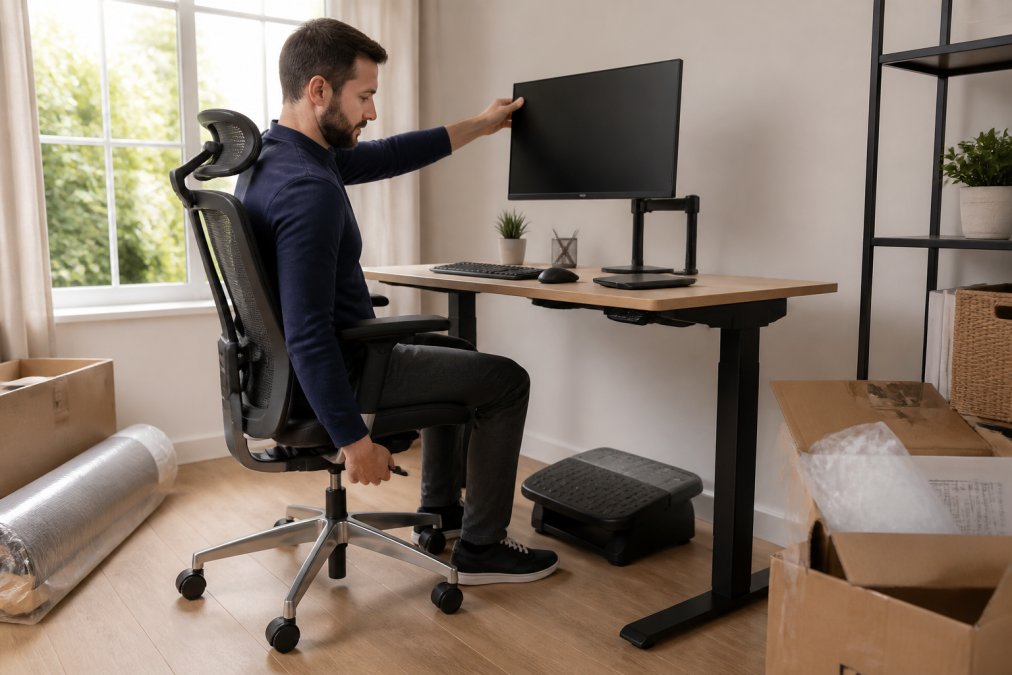
Work through the sequence below from top to bottom. Changing one setting affects the others, so this order stops you chasing your own adjustments.
Step 1, Chair height. Sit with your feet flat on the floor. Your knees should sit at roughly 90 degrees, level with or slightly below your hips. If your feet dangle, lower the chair. If lowering the chair pushes your knees above your hips, keep the chair where it is and add a footrest instead. A teardrop footrest tilts your pelvis slightly forward and takes load off the lower back.
Memory Foam Lumbar Support Cushion for →
Step 2, Seat depth. You should fit two to three fingers between the back of your knees and the seat's front edge. If the seat presses into your knees, it cuts circulation and pushes you into a slouch. A hand's width of gap means the seat is too shallow and your thighs aren't supported.
Step 3, Backrest angle. Set the backrest to roughly 100 to 110 degrees from the seat, not a rigid 90. A slight recline keeps your spine in its natural curve and reduces disc pressure.
Monitor Height and Eye Level
Monitor eye level means the top third of your screen sits at eye height, so you can read without tilting your head down.
Equipment-Free Desk Modifications
You don't need to buy anything to improve your setup. Try these adjustments first:
- Roll a towel into a cylinder and place it behind your lower back
- Use a firm cushion from your sofa as a temporary seat wedge
- Stack books under your monitor to raise it
- Place a box under your desk as a footrest
- Move your chair closer so you're not reaching for the keyboard
- Slide a folded jumper under your thighs if the seat feels too deep
Desk Stretches for Lower Back Pain You Can Do in Two Minutes
Desk stretches for lower back pain work best done often, not held long. Two minutes every hour beats 20 minutes once a day.
- Seated spinal rotation - Sit tall, cross arms over chest, rotate slowly left then right. Hold each side for 10 seconds.
- Cat-cow stretch - Sit forward, arch your back gently, then round it. Repeat 8 times.
- Shoulder shrugs - Lift shoulders to ears, hold 3 seconds, release. Repeat 10 times.
- Pelvic tilt - Rock your pelvis forward and back slowly. 10 repetitions.
- Neck rolls - Drop chin to chest, roll slowly side to side. 5 each direction.
Seated Spinal Rotation and Cat-Cow
Spinal rotation releases mid-back tension from sitting still; cat-cow improves joint mobility through your whole spine.
Shoulder Shrugs and Micro-Breaks
Micro-breaks are 30- to 60-second pauses where you change position or move, preventing the stiffness that builds during long sitting sessions.
Heat, Breathing and Pain Management at Your Desk
Heat therapy relaxes tight muscles and improves blood flow to the lower back. A heat wrap or self-heating belt worn during work hours eases stiffness without interrupting your day. The effect is temporary, so treat it as a way to make movement and stretching more comfortable, not a replacement.
Breathing Techniques for Pain Management
Breathing techniques help too, and this is where most desk-pain guides stop short. Slow, deep breathing reduces muscle tension and calms the nervous system, changing how much pain you register.
The Productivity Cost of Untreated Pain
Chronic low-level pain affects how you work, not just how you feel. It competes for the attention complex tasks need, which is why people with ongoing back pain report slower completion and more afternoon errors.
When to See a Doctor: Red Flags for Desk-Related Back Pain
Most desk-related back pain improves with movement, posture changes, and time. But some symptoms need medical attention.
See a doctor or physiotherapist if you notice:
- Pain that wakes you at night
- Numbness or tingling in your legs or feet
- Weakness in your legs
- Pain after a fall or injury
- Loss of bladder or bowel control
- Pain that gets worse despite weeks of self-care
| Red Flag | What It May Mean | Action |
|---|---|---|
| Night pain | Possible inflammation or infection | See GP within days |
| Leg numbness | Nerve compression | See GP or physio |
| Leg weakness | Nerve or muscle issue | Urgent assessment |
| Recent injury | Possible fracture | Same-day care |
| Bladder changes | Serious nerve involvement | Emergency care |
Conclusion
Back pain from desk work rarely has one cause. It builds from hours of stillness, poor setup, and skipped breaks. The fixes are simple but require consistency.
Frequently Asked Questions
Why does my upper back hurt when I sit at my desk?
Upper back pain usually comes from holding your head forward to read a screen that sits too low, which loads the neck and upper spine. Raising your monitor so the top of the screen is at or just below eye level, keeping your shoulders relaxed and taking micro-breaks every 30 to 45 minutes can reduce that load. If the ache continues for more than two weeks or comes with numbness, speak to a GP or physiotherapist.
How often should I take breaks to prevent back pain at desk?
Aim to stand and move for one to two minutes roughly every 30 to 45 minutes of sitting. Set a timer or use a standing reminder on your phone. During each break, walk to fill a glass of water or do a short seated spinal rotation. These micro-breaks interrupt the prolonged sitting that builds tension in the lower back, and they cost you almost no working time across the day.
What is the correct sitting posture to prevent back pain?
Sit with your feet flat on the floor or on a footrest, knees roughly level with your hips, and your lower back supported so the spine keeps its natural curve. Keep the screen at eye level and your elbows close to your sides. A lumbar cushion such as the Elevate Support Memory Foam Lumbar Support Cushion (£17.99) can help hold that position on chairs with a weak or flat backrest.
Are ergonomic chairs effective for chronic back pain?
Ergonomic chairs help by supporting the lumbar curve and letting you adjust seat height and depth, but they work best alongside movement and stretching rather than on their own. If a new chair is not an option, a contoured lumbar cushion and a seat cushion can add similar support to the chair you already own. Chronic pain that does not improve with these changes is worth discussing with a clinician.