
7 Best Ergonomic Accessories for Long Hours
Table of Contents
- Why Ergonomic Accessories Matter for Long Hours at Your Desk
- How to Choose the Right Ergonomic Accessories
- 1. Memory Foam Lumbar Support Cushion: Lower Back Relief (£17.99)
- 2. Memory Foam Seat Cushion: Pressure Distribution and Comfort (£16.99)
- 3. Adjustable Monitor & Laptop Stand: Eye-Level Alignment and Neck Support (£11.99)
- How to Fix Posture While Gaming: Wrist, Neck and Shoulder Support
- Ergonomic Desk Setup Guide: Footrests, Lighting and Posture Correction
- Quick Comparison Table
- Frequently Asked Questions
Last Updated: October 4, 2026
Why Ergonomic Accessories Matter for Long Hours at Your Desk
Long hours at your desk can lead to chronic pain, muscle tension, and musculoskeletal problems. The right ergonomic accessories can transform your workspace and comfort.
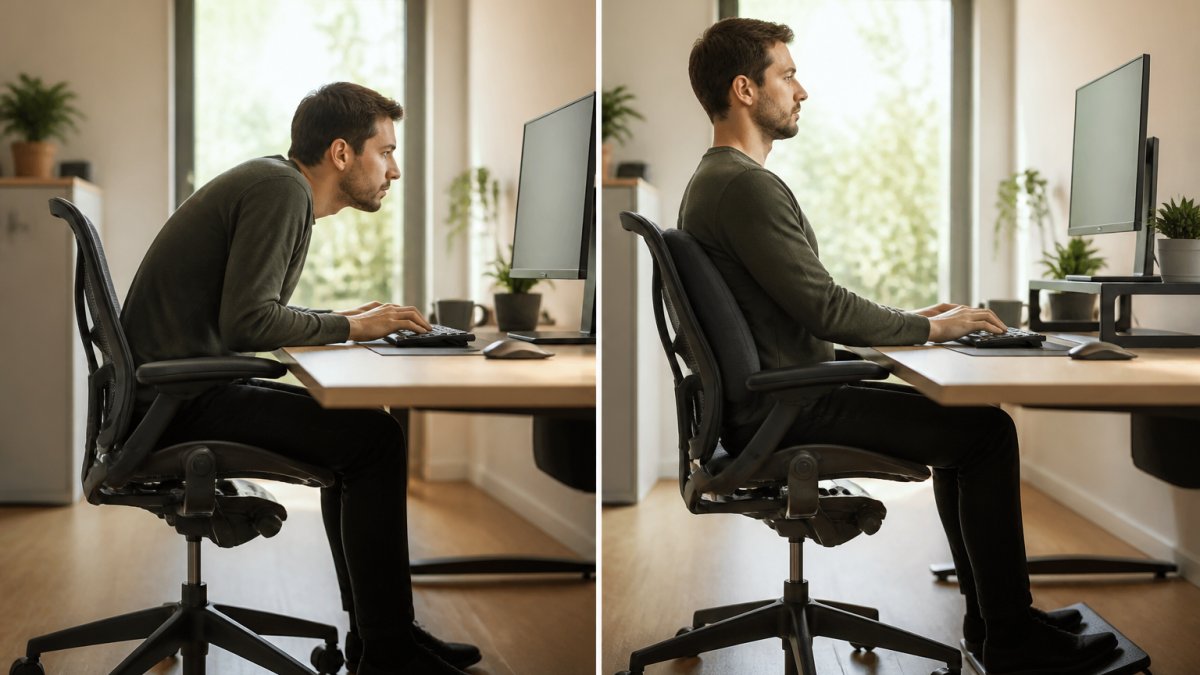
Prolonged sitting rounds your lower back, pushes shoulders forward, and strains your neck. Ergonomic accessories address these pressure points that standard furniture often ignores.
How to Choose the Right Ergonomic Accessories
Identify your pain points first. Prioritise the area causing the most acute pain or affecting your work quality.
Check compatibility with your existing setup. Most accessories are universal, but gaming chairs and compact desks may require careful planning.
Consider your work environment. If you move between locations, prioritise lightweight, portable options like memory foam cushions over fixed installations.

Test the material quality. High-density memory foam resists flattening better than budget alternatives. Breathable covers prevent heat buildup.
Budget strategically. You don't need to buy everything at once. Start with one or two accessories addressing your worst pain points. A quality lumbar cushion or seat cushion (£15-£18) often delivers the biggest comfort gain per pound spent. Add wrist support, footrests, or monitor stands as your budget allows.
1. Memory Foam Lumbar Support Cushion: Lower Back Relief (£17.99)
Prolonged sitting flattens your lower back's natural curve. A contoured lumbar support cushion restores that curve and distributes pressure evenly.
ElevateSupport's Memory Foam Lumbar Support Cushion features a contoured shape that sits naturally against your lower back with an adjustable strap to prevent slipping. It works in office chairs, car seats, and home seating.

Pros:
- Contoured shape matches natural lumbar curve
- Works in office chairs, cars, and home seating
- Adjustable strap prevents slipping
- Multiple colour options
- High-density memory foam resists flattening
Cons:
- Requires proper positioning to be effective
- Not suitable for chairs with very narrow backrests
- Best results when combined with proper posture
2. Memory Foam Seat Cushion: Pressure Distribution and Comfort (£16.99)
Standard office chairs create uneven pressure on your tailbone and sitting bones. A memory foam seat cushion spreads pressure across a larger surface area.
ElevateSupport's Memory Foam Seat Cushion uses ergonomic shaping to support your sitting position with a durable polyester cover. For 6-8 hour sitting stretches, it helps provide comfort with high-density foam that resists compression while conforming to your body's weight distribution.
Pros:
- Improves pressure distribution across tailbone and sitting bones
- Works in office chairs, car seats, and home furniture
- Lightweight and portable
- Soft polyester cover
- Affordable entry point for seat comfort
Cons:
- Works best when paired with lumbar support
- May slide on smooth chair surfaces
- Requires occasional repositioning during the day
3. Adjustable Monitor & Laptop Stand: Eye-Level Alignment and Neck Support (£11.99)
Monitor height determines your neck position for 8+ hours daily. Most laptops sit too low, creating "tech neck" posture. An adjustable monitor stand raises your screen to eye level.
ElevateSupport's Adjustable Monitor & Laptop Stand raises your screen to eye level with adjustable height settings and a non-slip base. The foldable design supports devices up to 17 inches and moves between workspaces.

Pros:
- Raises screen to eye level, preventing neck strain
- Multiple adjustable height settings
- Durable aluminium alloy or ABS construction
- Non-slip pads keep device secure
- Foldable and portable design
- Compatible with laptops, monitors, and tablets up to 17"
Cons:
- Requires desk space for placement
- May need additional cable management
- Best used with a separate keyboard for full ergonomic benefit
How to Fix Posture While Gaming: Wrist, Neck and Shoulder Support
Gaming sessions often exceed 6-8 hours with poor posture, leaning forward, gripping tightly, wrists bent at awkward angles, creating repetitive strain injury and chronic pain.
Memory Foam Wrist Rest (£13.99)
Gaming creates constant wrist tension and median nerve pressure. ElevateSupport's Memory Foam Wrist Rest features a cloud-shaped design that fits naturally under your palm and wrist, available in short and long options.
Pros:
- Memory foam provides soft support
- Cloud-shaped design fits natural wrist position
- Available in short and long options
- Multiple colours available
- Prevents wrist fatigue during long sessions
Cons:
- Requires proper positioning to be effective
- Works best with ergonomic mouse or keyboard
- May take a few days to adjust to
Ergonomic Vertical Wireless Mouse (£19.99)
A standard mouse forces your wrist into pronation. ElevateSupport's Ergonomic Vertical Wireless Mouse rotates your hand to a natural position with dual wireless connectivity (Bluetooth 5.2 and 2.4G), adjustable sensitivity up to 1600 DPI, and six buttons.
Adjustable Monitor & Laptop Stand →
Pros:
- Vertical design eliminates wrist pronation
- Dual wireless connectivity (Bluetooth and 2.4G)
- Adjustable sensitivity up to 1600 DPI
- 6-button design for gaming control
- Wireless keeps desk organised
- Suitable for laptops and desktop computers
Cons:
- Requires adjustment period (3-5 days)
- Not suitable for left-handed users
- May feel awkward initially if you've used standard mice for years
Ergonomic Armrest Cushions (£19.99)
Hard armrests create pressure points during gaming. ElevateSupport's Ergonomic Armrest Cushions add soft cushioning, supplied as a pair. They're easy to fit and remove, reducing elbow and shoulder tension.
Pros:
- Adds soft cushioning to hard armrests
- Supports elbows and forearms
- Supplied as a pair
- Easy to fit and remove
- Works with most standard office and gaming chairs
- Affordable comfort upgrade
Cons:
- Universal design may not fit all armrest widths
- Requires proper positioning
- May slide on smooth surfaces
Ergonomic Desk Setup Guide: Footrests, Lighting and Posture Correction
A complete ergonomic desk setup addresses your entire body, not just your back and neck. Your feet, lighting, and overall posture all influence your comfort during long hours of work.
Adjustable Memory Foam Footrest (£26.99)
Unsupported feet cause your lower back to round and hips to tilt. ElevateSupport's Adjustable Memory Foam Footrest features a removable lower layer to adjust height for your desk and chair combination, fitting under most workspaces.
Pros:
- Adjustable height with removable lower layer
- Memory foam provides soft support
- Fits under most desks
- Improves overall posture alignment
- Supports feet during long work sessions
Cons:
- Requires desk space underneath
- Adjustable design may need fine-tuning
- Best results when combined with proper chair height
Memory Foam Footrest (£15.99)
The Memory Foam Footrest provides affordable foot support with a contoured design and durable black fabric cover. Pair it with a lumbar cushion and seat cushion for full-body support.
Pros:
- Affordable foot support
- Memory foam provides comfortable surface
- Contoured design
- Black fabric cover is durable
- Works in most desk setups
Cons:
- Fixed height (not adjustable)
- Requires adequate desk clearance
- Works best with proper chair height
Monitor Light Bar (£19.99)
Poor lighting forces you to lean forward and squint, creating neck strain and eye fatigue. ElevateSupport's Monitor Light Bar mounts above your monitor with adjustable brightness and colour temperature, reducing eye strain and preventing forward head posture.
Pros:
- Adjustable brightness and colour temperature
- Space-saving monitor-mounted design
- Reduces eye strain and glare
- Helps maintain proper posture
- Sleek 30cm design
Cons:
- Requires monitor with mounting space
- Brightness adjustment has a learning curve
- May need cable management
Adjustable Back Support Brace (£17.99)
For chronic back pain, an adjustable back support brace provides active postural correction. ElevateSupport's Adjustable Back Support Brace pulls shoulders back and aligns your spine with breathable, adjustable materials. Combine with other ergonomic accessories and posture awareness.
Pros:
- Active postural correction
- Breathable, lightweight materials
- Fully adjustable for proper fit
- Discreet under clothing
- Helps retrain postural muscles
- Suitable for men and women
Cons:
- Requires adjustment period
- Not a long-term solution on its own
- Most effective when combined with ergonomic furniture
- May feel restrictive initially
Quick Comparison Table
| Accessory | Price | Primary Benefit | Best For | Key Feature |
|---|---|---|---|---|
| Memory Foam Lumbar Support Cushion | £17.99 | Lower back pain relief | Office, car, home seating | Contoured shape, adjustable strap |
| Memory Foam Seat Cushion | £16.99 | Tailbone and pressure relief | All seating environments | Portable, ergonomic shape |
| Adjustable Monitor & Laptop Stand | £11.99 | Neck alignment, eye-level viewing | Desk setup, gaming | Adjustable height, non-slip base |
| Memory Foam Wrist Rest | £13.99 | Wrist support during typing/gaming | Desk work, gaming | Cloud-shaped, multiple options |
| Ergonomic Vertical Wireless Mouse | £19.99 | Wrist position correction | Gaming, daily computer use | Vertical design, dual connectivity |
| Ergonomic Armrest Cushions | £19.99 | Elbow and forearm support | Office and gaming chairs | Pair of cushions, universal fit |
| Adjustable Memory Foam Footrest | £26.99 | Foot support with height adjustment | Desk work, gaming | Removable layer, adjustable height |
| Memory Foam Footrest | £15.99 | Basic foot support | Desk work, study spaces | Contoured, affordable |
| Monitor Light Bar | £19.99 | Proper workspace lighting | Work, study, gaming | Adjustable brightness and tone |
| Adjustable Back Support Brace | £17.99 | Active postural correction | Chronic back pain, posture training | Breathable, adjustable straps |
The 7 best ergonomic accessories for long hours address specific pain points that standard furniture ignores. Start with your worst pain point; a quality lumbar or seat cushion (£15-£18) often delivers the biggest gain. Build gradually with a monitor stand, wrist support, and footrests. Prevention through proper ergonomic support is far cheaper and easier than recovery. NHS guidance on posture and workplace ergonomics provides official recommendations for maintaining healthy posture during work. Health and Safety Executive guidance on workstation setup outlines legal requirements for ergonomic workplace design. British Chiropractic Association information on ergonomic support offers evidence-based guidance on posture correction and musculoskeletal health.
Frequently Asked Questions
Do ergonomic accessories actually help with back pain during long hours?
Yes. Ergonomic accessories address the root causes of discomfort: poor posture, uneven pressure distribution, and misaligned spinal positioning. Memory foam lumbar supports maintain neutral spine alignment, seat cushions distribute weight evenly to reduce pressure points, and monitor stands prevent cervical spine strain. Results depend on consistent use and proper setup; a single cushion won't compensate for an otherwise poor workstation.
What's the best way to fix posture while gaming for extended sessions?
Combine three elements: an ergonomic vertical mouse to keep your wrist in neutral position, armrest cushions to support your elbows, and a monitor at eye level. Gaming often involves leaning forward; these accessories counteract that tendency. A wrist rest prevents repetitive strain injury during long gaming sessions by reducing wrist fatigue and supporting the median nerve.
Can one ergonomic accessory work in both my office chair and car?
Memory foam seat and lumbar cushions are designed for dual use; both feature adjustable straps and contoured shapes that fit standard office chairs and car seats. The Memory Foam Lumbar Support Cushion (£17.99) and Memory Foam Seat Cushion (£16.99) are specifically listed as suitable for office, car and home use. Footrests and monitor stands are desk-specific and won't transfer to vehicles.
How long does memory foam in ergonomic accessories last before degrading?
Degradation depends on frequency of use, weight distribution and care. Premium high-density memory foam resists compression better than budget alternatives.